Dock / Gecko Moria ship · Steam PC launch case
Where to place the Thriller Bark Dock
The short answer
In ONE PIECE: Grand Gourmet, look at the bottom-left of the map for two green blocks separated from the main ship. Aim exactly onto one of them until the cursor changes into a small quill. That is the placement hotspot reported by players who got the Dock to work.
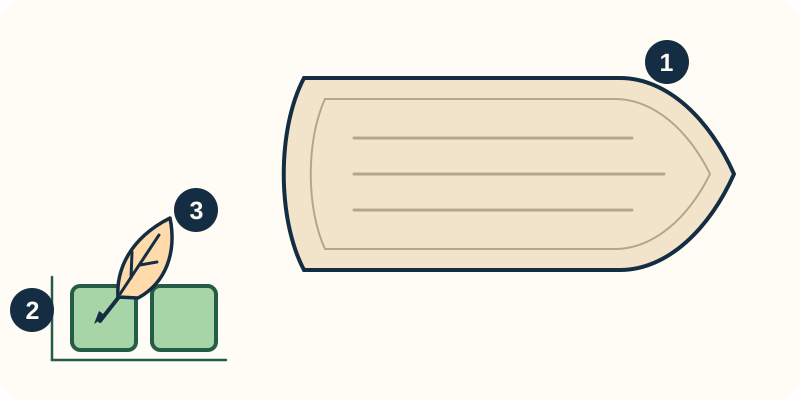
Find the detached Dock targets
- Main ship: look outside its lower-left edge.
- Two separate green blocks: these are the reported placement targets, not a distance of two tiles.
- Aim onto a green block until the cursor becomes a quill, then compare with your actual placement view.
Original relationship diagram, not a game screenshot or a complete map; not to scale. It illustrates the cited players’ location report, without guaranteeing every layout or platform.
Sources & review ↓The instruction about placing it near the bow led players to search the main ship and see red boxes everywhere. Two Steam threads point to the detached lower-left blocks instead; in the Geckomoria thread, the original poster confirms the suggested location worked.
On this page
Find the hotspot, then confirm
- With Thriller Bark's Dock or flag unlocked, open its placement view.
- Pan to the bottom-left of the map. Look beyond the main ship for the two separate green blocks.
- Move the cursor precisely onto one green block. Watch for the small quill cursor rather than continuing to click red ship-deck positions.
- Check the intended position and orientation before confirming. A launch-thread commenter warns that the placement cannot be changed later; we have not independently tested that restriction.
If every position still looks red
Recheck the detached blocks and the exact cursor position first. The sources do not establish that you must buy the largest ship before this works.
If those green blocks are absent, or the quill never appears, compare your platform and version with this Steam PC launch case. Record what the placement view shows for a support report; this guide does not establish a different hotspot for other platforms or later layouts.
✓ How to check the result
The target accepts the placement instead of remaining red, and you can confirm the Dock or flag at that location.
Finding one green block is the useful check; the sources do not give a measured two-tile distance from the ship.