Table themes · Check nearby furniture first
Why an indoor table becomes Deck-themed
The short answer
Before changing the floor in ONE PIECE: Grand Gourmet, check the nearby Tangerine Tree and other themed furniture. In the reported Steam case, the original poster identified the tree next to the table as the cause; another player explained that furniture themes affect nearby tables.
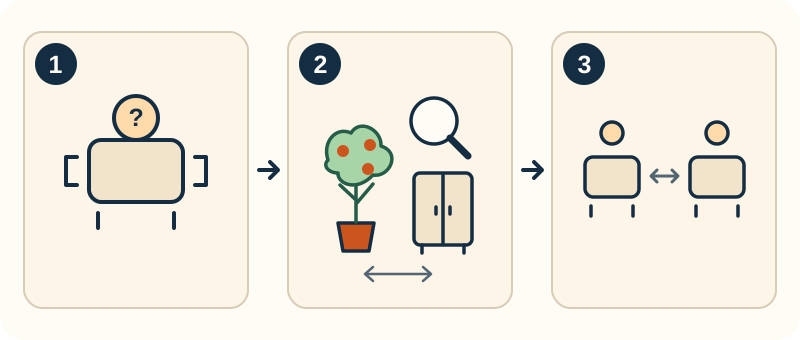
Check the theme source before changing the floor
- Inspect the affected table and its displayed theme.
- Check nearby Tangerine Tree and themed furniture first. Use a small reversible move if helpful.
- Compare the same table before and after. The two drawings represent observations, not a second table to buy.
Original diagnostic schematic, not a game screenshot or a measured effect radius. A change is not guaranteed; the separate wall question remains unconfirmed. Do not start by replacing the floor.
Sources & review ↓A table showing the Deck theme does not, by itself, identify a broken floor. The original report mixed a table-theme change with walls appearing or disappearing. Keep those observations separate so you do not rebuild the wrong part of the restaurant.
On this page
Trace the table theme
- Select or inspect the affected table and note the theme it displays. Keep a separate note of any wall or floor change.
- Inspect furniture near that table, beginning with the Tangerine Tree if one is present. Read each item's displayed theme or description.
- Before buying new flooring or removing a room, try a small reversible furniture move and compare the table's displayed theme again. This is a diagnostic check, not a promised wall repair.
- If the table theme changes as you move a themed item, you have identified an influence to account for in the layout. If only walls remain wrong, treat that as a separate problem.
When the symptom does not match
The source does not establish the exact influence radius or which theme wins when several furniture items overlap. Do not assume a fixed number of tiles or that one tree explains every case.
If the table stays Deck-themed after the suspected furniture is moved, keep the before-and-after layout and version. The reported tree diagnosis may not explain your arrangement; do not keep replacing floors on that assumption.
If you mean the walls rather than the table
A separate Steam question asks how the game distinguishes inside from outside. Its replies say dining-room flooring adds an indoor area and walls, while Deck flooring removes those walls; another reply identifies Deck or fish-marked pieces as outdoor items. Those replies were not followed by an original-poster success confirmation.
Use that as a separate, attributed flooring lead when the actual problem is the room boundary. It does not replace the nearby-furniture check for a table showing the Deck theme. Keep the original layout recorded and compare the same table before deciding that a floor change is relevant.
✓ How to check the result
You can distinguish the table's theme from the physical floor or walls and identify whether a nearby themed item changes the table's display.
A theme change alone does not prove the walls have been repaired.
Sources & review
- Deck Area is constantly clashing with interior! — OP identifies the tree in #1; furniture-theme explanation in #2 ↗
- Official gameplay guide — furniture creates moods around tables ↗
- Official Steam 1.0.7 update notice ↗
- Steam: Walls? Outside vs Inside? - separate flooring explanation, replies #1-2; no OP confirmation ↗